eInvoice from 2027: what companies need to do and how to prepare
From 1 January 2027, the way invoices are issued, sent and received in Slovakia will change significantly.
An electronic invoice will no longer be just a PDF document sent by email. It will be a structured electronic document that can be processed automatically by accounting or ERP systems.
Companies therefore need to prepare not only for a legislative change, but also for the technical side of implementation. The good news is that businesses can already prepare and test their solutions during 2026.
What is an eInvoice?
An eInvoice is an invoice created in a standardized electronic format that allows automated processing of invoice data.
It is therefore not just a PDF file.
Today, a PDF invoice is often opened by a user, checked manually and then entered into the accounting system, or processed using OCR. With eInvoicing, the accounting or ERP system receives the invoice data in a structured format.
An electronic invoice can include, for example:
- supplier and customer information,
- invoice number,
- dates,
- invoice lines,
- quantities and prices,
- VAT rates and amounts,
- currency,
- payment details,
- purchase order references.
The Slovak eInvoicing system uses the European Peppol infrastructure and standardized data formats that allow automated exchange of invoices between companies and information systems.
Who does eInvoicing apply to?
From 1 January 2027, every Slovak legal entity and every taxable person must be ready to receive eInvoices, regardless of whether they are VAT registered.
For transactions covered by the legislation, mandatory issuing and electronic exchange of invoices will also start from this date.
What does a company need to do?
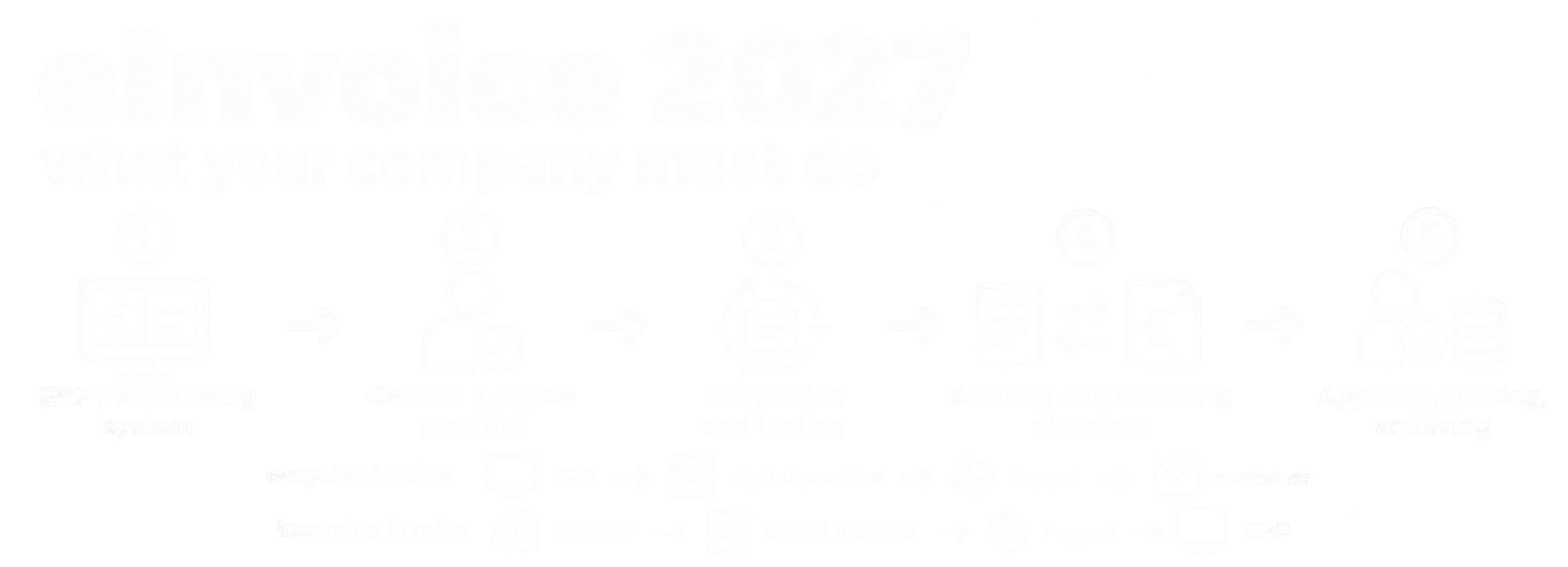
Preparation for eInvoicing can be divided into five main steps:
1. Check whether your ERP or accounting system is ready
2. Choose a digital mailbox provider
3. Prepare the integration
4. Test sending and receiving invoices
5. Set up processing, approval and archiving
1. Choose a digital mailbox provider
One of the first steps is to choose a digital mailbox provider, meaning a certified delivery service provider.
The digital mailbox provider handles communication between your company and the electronic invoicing infrastructure.
In simplified form, the process may look like this:
ERP → digital mailbox provider → Peppol → customer’s digital mailbox provider → customer ERP
When choosing a provider, the company should not look at price only. It is important to check:
- integration options with your ERP or accounting system,
- expected number of sent and received invoices,
- document archiving,
- access for external accountants,
- handling of error statuses,
- technical support and SLA.
2. Decide how you want to process eInvoices
There are essentially two main options.
Option A – Use the digital mailbox provider’s application
A smaller company can work directly in the provider’s application.
A typical process may look like this:
accountant creates the invoice → uploads or creates it in the provider’s system → provider sends it
For incoming invoices:
digital mailbox provider → user opens the invoice → invoice data is then processed in accounting
The advantage is easier implementation. The disadvantage is a higher amount of manual work.
Option B – Direct integration with the ERP system
For companies with a higher volume of invoices, direct integration with the ERP system is usually more suitable.
The user creates the invoice in the ERP system in the same way as today, while the rest of the process runs automatically in the background.
The system can automatically:
- read the invoice,
- validate mandatory data,
- generate the required electronic format,
- send the document to the digital mailbox provider,
- monitor processing status,
- write the result back to the ERP system.
3. Prepare your ERP or accounting system
For larger companies, this is often the most important step.
The company should verify with its ERP supplier whether the system:
- supports Slovak eInvoicing,
- allows export of sales invoices,
- allows import of received invoices,
- provides an API or another integration interface,
- contains all required data,
- can store statuses of sent invoices,
- can handle errors and rejected documents.
For systems such as Microsoft Dynamics 365 Business Central, Dynamics NAV, IFS Cloud, SAP or other ERP systems, the solution can often be implemented as a separate integration layer without significantly changing the way users work.
4. Do not forget incoming invoices
Companies often focus primarily on sending invoices.
However, incoming eInvoices offer even greater potential for automation.
Today, the process often looks like this:
email → PDF → OCR → manual entry → validation
With eInvoicing, the process can look like this:
eInvoice → ERP → automatic validation → approval → posting
Because the invoice data arrives in structured form, the system can automatically identify:
- supplier,
- invoice number,
- amount,
- VAT,
- due date,
- purchase order,
- invoice lines.
5. Fulfil the legal requirement or automate the whole process?
A company can choose a simple solution whose only purpose is to ensure that eInvoices can be sent and received.
However, eInvoicing can also be used as an opportunity to automate the entire invoice process.
For example:
eInvoice
↓
data validation
↓
purchase order matching
↓
goods receipt verification
↓
approval workflow
↓
document creation in ERP
↓
posting and archiving
For companies processing hundreds or thousands of invoices per month, this can be one of the biggest benefits of the entire change.
Who can choose the digital mailbox provider?
The digital mailbox provider does not necessarily have to be selected only by the company’s statutory representative.
It can also be selected by a person authorized to act on behalf of the company towards the Slovak Financial Administration, depending on the scope of their authorization.
This may include, for example:
- an authorized employee,
- an accountant,
- an external accounting company.
Can the digital mailbox provider be changed later?
Yes.
Choosing a provider does not have to be a permanent decision for the entire lifetime of the eInvoicing system.
However, changing the provider may also require changes to the technical ERP integration, so it is advisable to verify integration options before making the initial selection.
What if your customer uses a different provider?
This should not be a problem.
Peppol is designed to provide interoperability between different service providers.
Your company can therefore use one digital mailbox provider while your customer uses another.
There is no need to create a separate integration for every customer. The eInvoicing infrastructure takes care of routing the document to the correct recipient.
What should companies do now?
1. Check ERP capabilities
Contact your ERP supplier and verify what eInvoicing and integration options your system supports.
2. Choose a digital mailbox provider
Compare certified providers not only by price, but also by their integration capabilities.
3. Define the required level of automation
A company processing ten invoices per month needs a different solution than a manufacturing company processing thousands of documents.
4. Prepare the integration
The ERP system and the digital mailbox provider must be able to communicate reliably and exchange all required data.
5. Test before 2027
The integration should be tested well in advance so that there is enough time to resolve any issues related to data, ERP configuration or integration interfaces.
What can the final process look like?
Outgoing invoice
ERP → validation → eInvoice → digital mailbox provider → Peppol → customer
Incoming invoice
supplier → Peppol → digital mailbox provider → eInvoice → ERP → approval → posting
With a properly designed integration, users can continue working almost exactly as they do today.
eInvoicing is not only a legal requirement
For companies processing a larger number of documents, the introduction of eInvoicing can also be an opportunity to automate processes that are currently based on PDFs, emails, OCR and manual checks.
The biggest benefits may include:
- automatic import of incoming invoices,
- elimination of manual data entry,
- duplicate invoice checks,
- purchase order matching,
- automatic approval workflows,
- document status tracking,
- ERP integration,
- electronic archiving.
How can 4B Software help?
4B Software provides integrations between the Slovak eInvoicing system and existing ERP systems.
The solution can provide:
ERP ↔ 4B eInvoice Connector ↔ digital mailbox provider ↔ Peppol
The goal is to allow users to continue working in their existing ERP system while the technical communication with the eInvoicing infrastructure runs automatically in the background.
The integration can be adapted to the customer’s ERP system and existing business processes.
Are you using Microsoft Dynamics 365 Business Central, Dynamics NAV, IFS Cloud, SAP or another ERP system?
We can review your current setup and propose what needs to be prepared before 1 January 2027.
See our solution Slovakia eInvoice.
I’m interested in eInvoice →