eInvoice for Microsoft Dynamics 365 Business Central in Slovakia
From 1 January 2027, Slovak companies will face a major change in invoicing. An electronic invoice will no longer be just a PDF document sent by email. Invoices will be issued, sent and received in a structured electronic format that information systems can process automatically.
For companies using Microsoft Dynamics 365 Business Central, this means preparing the ERP system for a new way of exchanging invoices electronically.
The good news is that Business Central already includes technologies for working with electronic documents. However, the Slovak eInvoice is not just about creating an XML file. The entire process needs to be addressed – from data in Business Central, through invoice validation and sending, to receiving, checking, approving and posting incoming invoices.
What will change for Business Central from 2027?
Today, many companies follow a standard process: create an invoice in Business Central, generate a PDF document and send it to the customer by email.
With the Slovak eInvoice, the process will be different.
The invoice will contain structured data that the system must generate correctly and then send electronically through the relevant infrastructure.
In simplified form, the process may look like this:
Microsoft Dynamics 365 Business Central → eInvoice → Peppol / Digital Postman → business partner
The same principle works in the opposite direction:
supplier → Peppol / Digital Postman → eInvoice → Business Central
The goal is to avoid users having to manually export, re-enter or upload invoices into other systems.
Microsoft Dynamics 365 Business Central already supports electronic documents
Microsoft Dynamics 365 Business Central includes functionality for working with electronic documents.
In current versions of Business Central, Microsoft uses the E-Documents functionality, which enables companies to work with electronic sales and purchase documents and integrate them with external services.
Business Central also supports electronic invoices in the Peppol format.
This provides a good technical foundation.
However, for Slovak legislation, it will still be necessary to ensure correct data mapping, validation, communication with the electronic delivery service provider, and the entire process of sending and receiving invoices.
How can eInvoice sending from Business Central work?
Users can continue creating sales invoices directly in Business Central in a similar way to today.
After the invoice is posted, an integration solution can automatically handle the next steps.
1. Loading data from Business Central
The required data is retrieved from the invoice, for example:
- supplier,
- customer,
- VAT ID,
- invoice number,
- issue date,
- supply date,
- invoice lines,
- quantities,
- prices,
- VAT rates,
- VAT amounts,
- total amount,
- payment details.
The accuracy of this data will be particularly important for electronic invoicing.
2. Creating the electronic invoice
The data from Business Central is transformed into the required structured electronic format.
The user therefore does not need to manually export the invoice or recreate it in another system.
3. eInvoice validation
Before the invoice is sent, it is advisable to validate it automatically.
Validation can identify issues such as:
- missing mandatory data,
- incorrect business partner identification,
- incorrect tax data,
- missing codes,
- errors in the electronic document structure.
It is better to identify such an error before the document is sent.
4. Sending via a Digital Postman
A validated eInvoice can then be sent automatically through a selected electronic delivery service provider.
The Business Central user therefore does not need to work in another portal or manually upload invoices.
5. Information about the result
Business Central or the integration solution can keep track of the document processing status.
The user can therefore see statuses such as:
Prepared → Validated → Sent → Delivered
If a problem occurs, the system can notify the responsible user.
How will receiving eInvoices into Business Central work?
Receiving invoices can be even more interesting for companies than sending them.
In a traditional process, a PDF invoice often arrives by email. Someone then has to open it, check it and manually enter or import the data into the ERP system.
With a structured eInvoice, the data is already available electronically.
The process can therefore look like this:
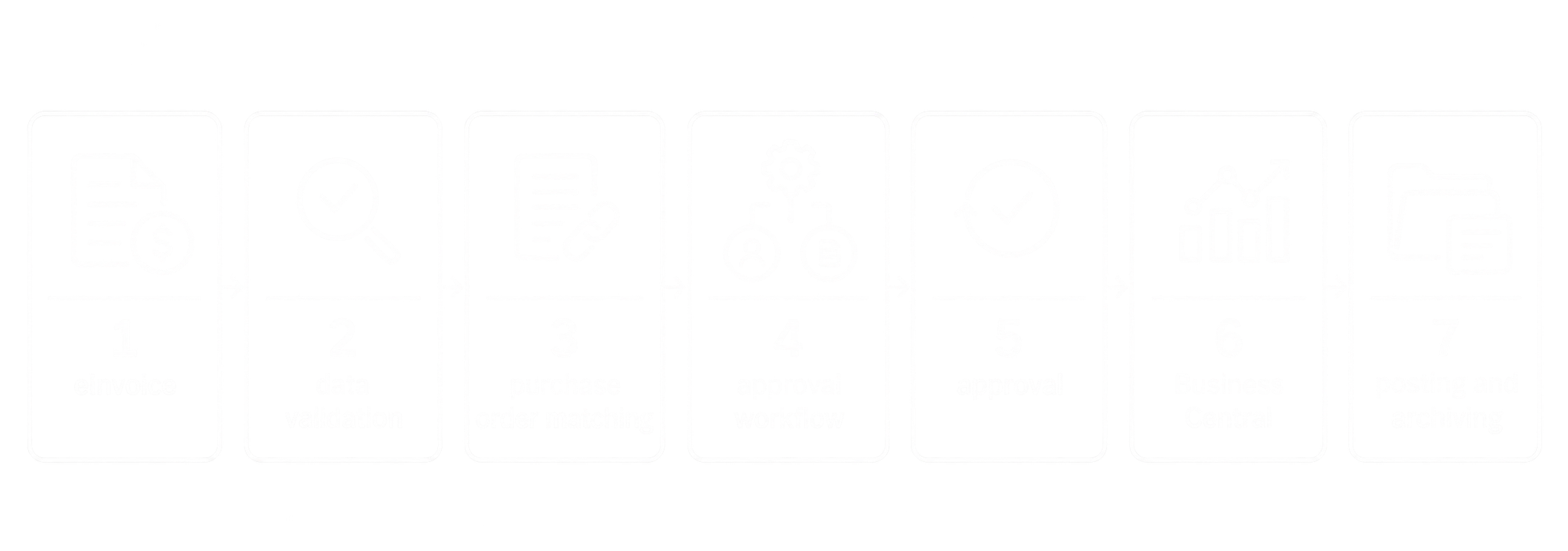
Received eInvoice → validation → approval → Business Central → posting → archiving
Automatic creation of a purchase invoice
Data from a received electronic invoice can be used to create the relevant purchase document in Business Central.
The system can work with data such as:
- supplier identification,
- supplier invoice number,
- dates,
- items,
- G/L accounts,
- dimensions,
- amounts,
- VAT,
- purchase order or other references.
The result can be a significant reduction in manual data entry.
Matching the eInvoice with a purchase order
If the company uses purchase orders, a received eInvoice can be automatically compared with an existing order.
The system can check, for example:
purchase order → goods/service receipt → invoice
This process makes it possible to identify discrepancies before the invoice is posted.
These can include differences in:
- quantity,
- price,
- ordered item,
- total invoice value.
Approval of received eInvoices
Receiving an electronic invoice is usually not the end of the process.
The invoice often needs to be approved by a department manager, cost centre owner, project manager or other responsible users.
4B Software can connect electronic invoicing with the Request Management Portal (RMP).
A received invoice can automatically continue into a defined workflow.
For example:
eInvoice
↓
data validation
↓
purchase order matching
↓
approval workflow
↓
approval
↓
Business Central
↓
posting and archiving
The approval process can be configured according to the company’s internal rules – for example based on invoice value, department, cost centre, project or a specific supplier.
eInvoice and master data in Business Central
One of the areas companies should review before 2027 is master data.
With electronic invoicing, companies will no longer be able to rely on someone manually correcting incomplete information while processing a PDF document.
Important data will include:
- company names,
- addresses,
- company registration numbers,
- VAT IDs,
- bank details,
- payment terms,
- units of measure,
- tax setup,
- business partner identifiers.
The better the quality of the data in Business Central, the easier it will be to automate eInvoice processing.
Do we need to replace Business Central because of eInvoice?
No.
If you are already using Microsoft Dynamics 365 Business Central, the goal is not to replace your ERP system.
Quite the opposite.
The role of the integration solution is to allow users to continue working in Business Central while communication with the electronic invoicing infrastructure runs as automatically as possible in the background.
Users should not have to work in several different applications just to send or receive an invoice.
What if we use an older version of Microsoft Dynamics NAV?
Electronic invoicing will not only affect companies using the latest version of Business Central.
Many Slovak companies still use Microsoft Dynamics NAV.
Even in this case, an integration solution can be prepared between the existing ERP system and the Slovak eInvoice.
The available options depend on the specific Dynamics NAV version, existing customizations and the way the company currently processes invoices.
If you use an older version of NAV, we therefore recommend starting preparation early.
When should you start preparing Business Central for eInvoice?
Ideally during 2026.
The technical integration itself is only one part of the project.
Before going live, it is advisable to review:
- the Microsoft Dynamics 365 Business Central version,
- the way sales invoices are issued,
- the way purchase invoices are received,
- the quality of master data,
- existing approval processes,
- the use of purchase orders,
- integrations with other systems,
- invoice archiving,
- error handling,
- communication with the Digital Postman.
The entire process can then be tested before mandatory operation begins.
eInvoice can be an opportunity for automation
Mandatory electronic invoicing does not have to be just another legislative obligation.
For companies using Business Central, it can also be an opportunity to remove a significant amount of manual work from invoice processing.
Instead of:
PDF → email → open document → re-enter data → validation → approval → ERP
the process can become:
eInvoice → automatic import → validation → workflow → Business Central
The more invoices a company processes, the greater the benefit of automating the entire process can be.
How can 4B Software help?
4B Software specializes in Microsoft Dynamics 365 Business Central, Dynamics NAV, integrations and business process automation.
For the Slovak eInvoice, we can design a solution based on your company’s existing environment.
It can include:
- integration of Business Central with the Slovak eInvoice,
- generation of electronic invoices,
- data validation,
- sending eInvoices,
- receiving eInvoices,
- communication with the Digital Postman,
- processing error states,
- automatic import of received invoices,
- purchase order matching,
- invoice approval,
- integration with the Request Management Portal,
- document archiving.
The goal is to make electronic invoicing fit naturally into your existing processes without adding unnecessary manual work for users.
Slovakia eInvoice for Business Central
If you use Microsoft Dynamics 365 Business Central or Microsoft Dynamics NAV, we recommend starting preparations for the Slovak eInvoice well in advance.
See our solution Slovakia eInvoice – integration with Business Central and ERP systems.
We can review your existing environment, the way you issue and receive invoices, and propose a suitable integration approach.